Clients
Every owner and pet you look after. Browse by owner or by pet, search across both, and add new clients one at a time or by importing contacts.
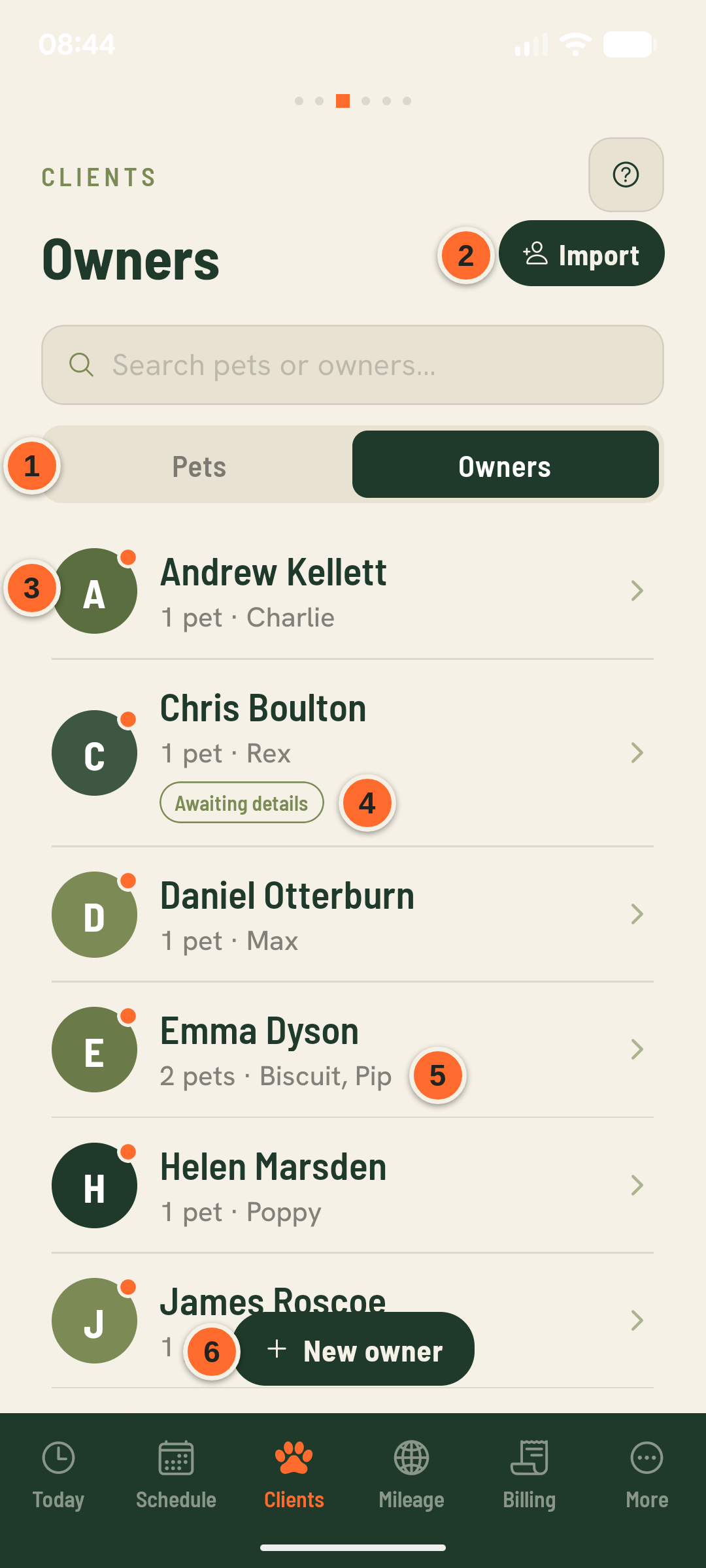
- 1Pets / Owners
Switch between browsing by pet or by owner — the same clients, grouped differently. Search works across both.
- 2Import
Bulk-import owners from your phone contacts instead of adding them one at a time.
- 3Orange dot
This owner has services you haven't billed yet, or a bill that's still unpaid. Their page shows which.
- 4Awaiting details
You've sent this owner a link to fill in their own details and pets, and they haven't done it yet. The marker goes once they submit or the link expires.
- 52 pets · Biscuit, Pip
Every pet under one owner. A booking can bundle pets from the same owner or from several owners together — see the bundled-walks guide.
- 6New owner
Starts the client form — collects contact details, address (used for mileage and travel-time estimates), and preferred walk times.